AI wedding planning with your real guest list
On Pro, yourwedding.app connects your own Claude or ChatGPT to your real guest list, replies and website drafts, so you can ask who hasn’t replied or add guests from your notes.
How it works
- In Your AI, choose Read or Read and write.
- Add the connector in Claude or ChatGPT and sign in.
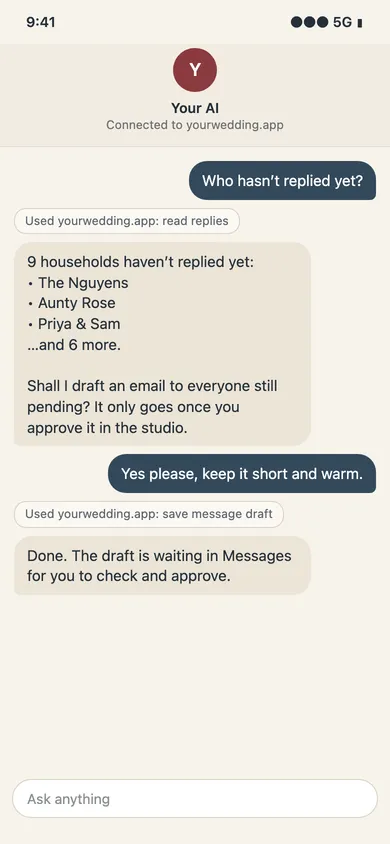
- Ask about your guests. Any message it drafts waits for your approval.
Connect from Your AI in the studio
Open Your AI, choose Read or Read and write, copy the connector address and follow the setup guide for your AI. Sign in with your studio account and check the wedding before allowing access. Host account and administrator requirements can vary.
What can we ask our AI?
Try “Who has not replied?” or ask for a summary of your replies. With Read and write, it can also add and move guests, record replies, and update your wedding details, questions, travel, style and website drafts. Check the result in the studio before relying on a change.
Can it send messages or publish our site?
Read lets your AI answer questions. Read and write also allows the supported edits. It can draft a message to your guests, but it sends only a draft you approved in the studio, and only if you allowed sending. Invitations, payments, publishing, deleting the wedding and changing members or retention stay in the studio. Page edits remain drafts until you publish.
What guest details does it see?
The AI provider receives names, households, replies, dietary notes and answers needed for its tools. Guest emails and mobile numbers are excluded from read results. If you give it message access, the messages it reads can hold personal details too. Your provider may store shared details in the United States under your agreement with it; review the consent screen and privacy policy before connecting.
Claude wedding planning: setup and prompts →
Best AI wedding planner apps in Australia →
AI wedding website: three ways to make one →
Questions
- Do we need our own AI account?
- Yes. Your AI account supplies the assistant. The yourwedding.app connector requires Pro. Check your host’s current account and administrator requirements in the setup guide.
- Can we disconnect later?
- Yes. Disconnect in Your AI to stop future access. Disconnecting does not erase information already shared with your AI provider.
Free for up to 5 guests. Wedding is A$229 and Pro A$299, each paid once per wedding in Australian dollars, GST included. No subscription.