Can we use our own domain?
Last updated 17 October 2026
Yes, on Wedding or Pro. You add two records where you bought the domain, then we set it up.
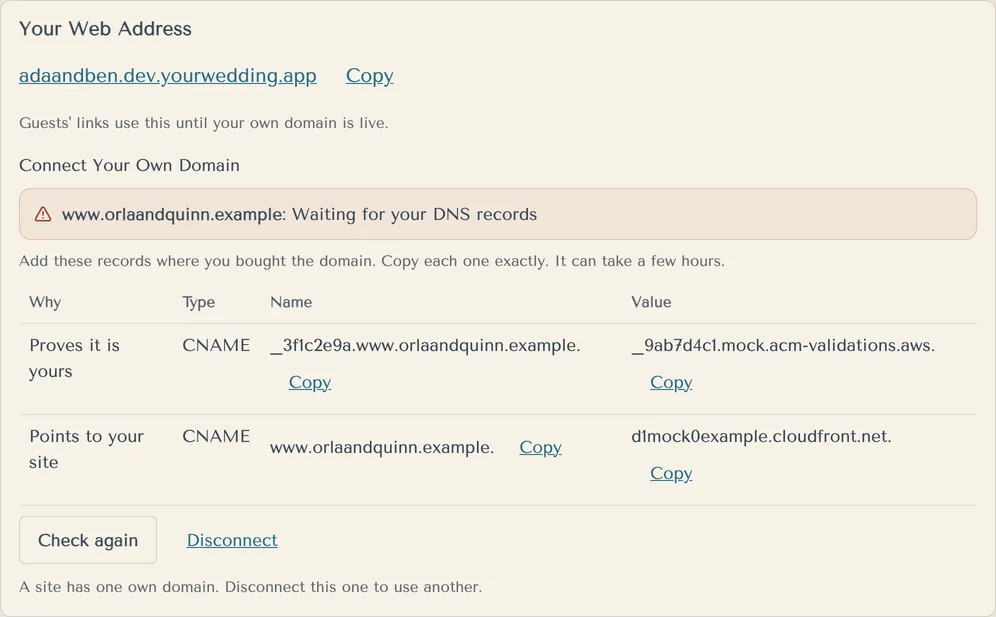
- Open Invitations and find Your Web Address.
- Under Connect Your Own Domain, type it (for example
www.yournames.com) and press Connect. - Copy each record in the table into your domain company's DNS settings, exactly as shown.
- Come back and press Check again. It can take a few hours.
- When the status says Live, guests' links use your domain.
A site has one own domain. Press Disconnect to use another.
A domain without "www" needs your DNS company to support ALIAS or CNAME flattening. The www version is safer.
If your package goes back to Free, your own domain is disconnected.
More in Your website
- Where do I put our names, date and venue?
On Basics. Nothing goes live until you publish.
- How do I change how our site looks?
Pick a style on Look. Each style comes with matched fonts and colours, by day and by evening.
- Can I change the fonts and colours?
Yes, on a paid package. Open Fine-tune fonts and colours on Look.
- What is a scene, and how do I pick one?
A scene is the drawn picture of your venue on your invitation email and site. Pick the one closest to your place.
- Our venue isn't in the scenes. Can you draw it?
You can ask us to, on a paid package. We read every request, and we'll email you if we add it.
- How do I add the timeline for the day?
On The Day. Add your times, and we add golden hour and sunset for you.
- How do I add travel, coaches and places to stay?
On Travel & Trip. What you add here also shapes the reply questions and the lists you get back.
- How do I see what guests will see?
Look at What Guests See on the right of each editing screen. It shows your draft, before you publish, as a guest sees it.
- How do I make our changes live?
Press Publish at the top of the studio. Saving alone never changes your live site.
- Can we change our web address?
You choose your web address during setup. It uses 3 to 40 lowercase letters, numbers and single hyphens.
Still stuck?
Open Help in the studio and choose Contact us. We email you a reference. Can’t sign in? Email us instead.
Contact us in the studioEmail hello@yourwedding.app
Guests: please ask the couple first.