Where do I put our names, date and venue?
Last updated 18 October 2026
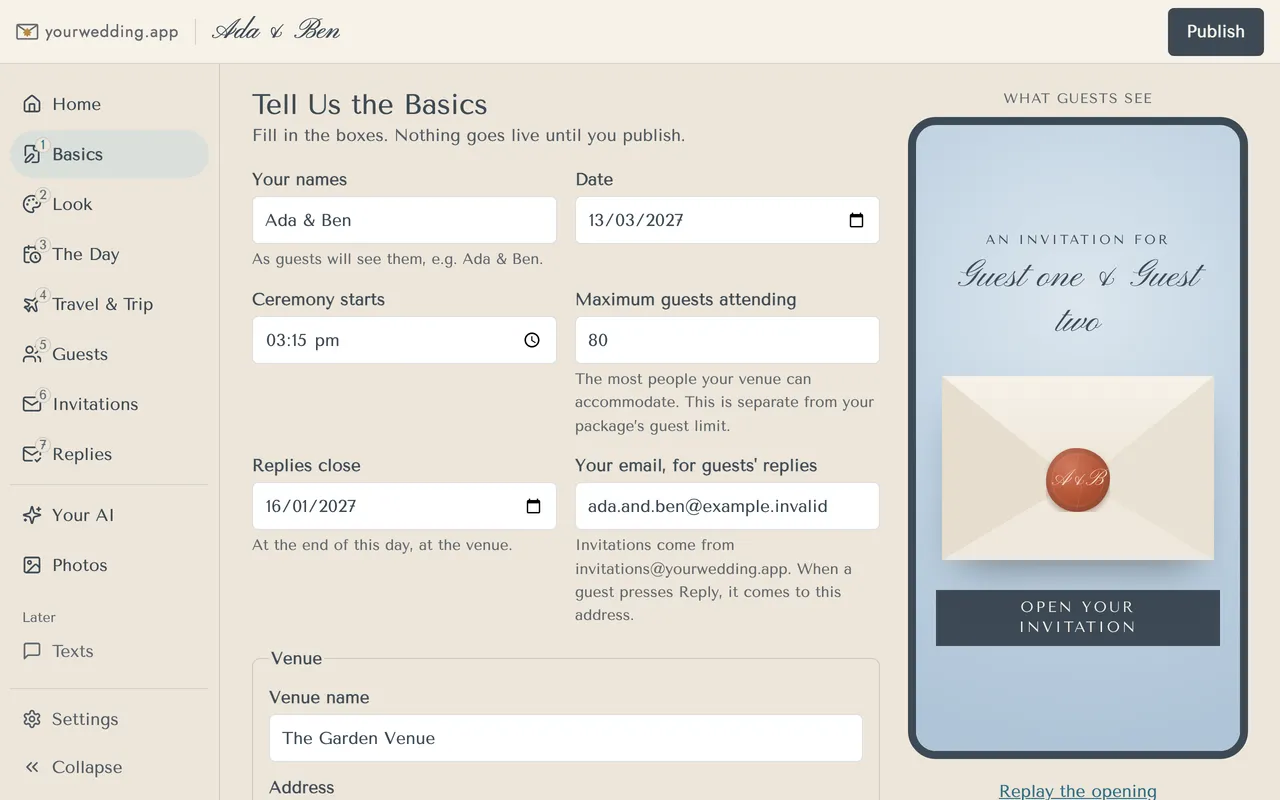
On Basics. Nothing goes live until you publish.
- Open Basics.
- Fill in Your names, Date and Ceremony starts.
- Set Maximum guests attending. This is how many your venue holds. It is separate from your package's guest limit.
- Set Replies close. Replies close at the end of that day, at the venue. It must be before the wedding.
- Add Your email, for guests' replies. Invitations come from invitations@yourwedding.app. When a guest replies to an email, it comes to this address.
- Search for your Venue, then drag the pin to the right spot if needed.
- Press Save or Save and next.
The date can't be in the past, and must be within the next five years.
If the address lookup isn't working, type the address and drop the pin by hand.
You choose the wedding's time zone during setup. It cannot be changed on Basics. If you picked the wrong one, contact us with your wedding's web address and the correct time zone before sending invitations. We will check what needs correcting; changing the ceremony time alone does not change the time zone.
More in Your website
- How do I change how our site looks?
Pick a style on Look. Each style comes with matched fonts and colours, by day and by evening.
- Can I change the fonts and colours?
Yes, on a paid package. Open Fine-tune fonts and colours on Look.
- What is a scene, and how do I pick one?
A scene is the drawn picture of your venue on your invitation email and site. Pick the one closest to your place.
- Our venue isn't in the scenes. Can you draw it?
You can ask us to, on a paid package. We read every request, and we'll email you if we add it.
- How do I add the timeline for the day?
On The Day. Add your times, and we add golden hour and sunset for you.
- How do I add travel, coaches and places to stay?
On Travel & Trip. What you add here also shapes the reply questions and the lists you get back.
- How do I see what guests will see?
Look at What Guests See on the right of each editing screen. It shows your draft, before you publish, as a guest sees it.
- How do I make our changes live?
Press Publish at the top of the studio. Saving alone never changes your live site.
- Can we use our own domain?
Yes, on Wedding or Pro. You add two records where you bought the domain, then we set it up.
- Can we change our web address?
You choose your web address during setup. It uses 3 to 40 lowercase letters, numbers and single hyphens.
Still stuck?
Open Help in the studio and choose Contact us. We email you a reference. Can’t sign in? Email us instead.
Contact us in the studioEmail hello@yourwedding.app
Guests: please ask the couple first.