Download our free wedding guest list template for Excel or Google Sheets. No email or sign-up. It has one row per guest grouped into households, an A and B list, and a tab that counts your numbers. The same file imports into yourwedding.app for online RSVPs, free for up to 5 guests.
At a glance5 points · 7 sections
At a glance
- One row per person. Everyone who replies together shares one Household name.
- Keep your B list on the same sheet with Invited? set to No. Change it to Yes when you invite them.
- Name every plus-one in their own row. Children under 16 need no email or mobile.
- Ask for dietary needs on the RSVP, not in the spreadsheet, so guests tell you themselves.
- The template is free. Importing more than 5 guests into yourwedding.app needs a paid plan.
Fill it in together, one person per row, before you decide who to cut. It's easier to choose from a full list than from memory, and the counts update as you type.
It's an Excel file. To use Google Sheets, open a new sheet, choose File, then Import, and upload it (Import data sets & spreadsheets). It opens in Numbers too. Inside are three tabs: Start here, Guest list and Summary.
What goes in each column?
The dark headings are the ones our wedding guest list app reads when you import the file. The grey headings are for your own planning, and the import leaves them out.
| Column | What to put | Imports? |
|---|---|---|
| Household | One name for everyone who shares a reply, like "Hart" | Yes, needed |
| First name | One named person per row | Yes, needed |
| Last name | Their surname | Yes |
| Where their invitation goes. Up to five, with commas between | Yes | |
| Mobile | For a text invitation to an Australian mobile. Kept as text, so the 0 stays | Yes |
| Child (under 16) | Yes for a guest under 16. They need no email or mobile | Yes |
| Reply by phone | Yes if you'll ring them and enter their reply yourself | Yes |
| Invited? | Yes, No or Example | Yes. Rows marked Yes come in |
| Plus one? | Yes if they may bring someone you can't name yet | Yes. It flags a name to add |
| Tier (A or B) | A list or B list | No |
| Side | Whose side, or Both | No |
| Relationship | Aunt, workmate, school friend | No |
| Postal address | For save-the-dates or thank-you cards by post | No |
| Dietary notes | Anything you already know. Guests tell you the rest on the RSVP | No |
| RSVP | Yes, No or Pending, if you track replies here | No |
| Meal | Their meal choice | No |
| Table | Their table number | No |
| Gift | What they gave | No |
| Thank-you sent | Yes once the card is in the post | No |
| Notes | Anything else | No |
Keep the dark headings as they are. The import looks for them in the first 20 rows, so a title row above them is fine. The five example rows say Example under Invited?, so they never import. Type over them, or delete them.
The Summary tab counts as you go: people invited, your B list, households, children, plus-ones still to name, and RSVP yeses and nos. Type your caterer's cost per head and it multiplies it by your yeses.
How do we organise a wedding guest list?
Write everyone down first, then group, sort and cut.
- Write everyone down. Make your lists separately, then merge them. One person per row. Don't cut anyone yet.
- Group them into households. Everyone who replies together gets the same Household name: a couple, a family, housemates. A surname works.
- Mark your A and B lists. A is everyone you'd invite whatever happens. B is people you'll invite if numbers or budget allow.
- Add contact details. An email or a mobile for at least one person in each household. If a guest doesn't do email, set Reply by phone to Yes and call them.
- Set Invited? Yes for your A list, No for your B list. Change a No to Yes when you invite them.
- Check the Summary tab against your venue's limit and your budget, then cut or add.
Easy Weddings says many couples now use a tiered list "instead of over-inviting and hoping for declines" (Wedding guest lists). That's what the Tier and Invited? columns are for.
How do we handle plus-ones and children?
Give every guest their own row, by name, partners and children included.
If someone may bring a partner you haven't met, set Plus one? to Yes on their row. That reminds you to ask for the name. Once you know it, add the partner as their own row in the same household. yourwedding.app has no unnamed plus-ones. If an import has a "plus one" or "guest of" row, we ask you to name that person instead.
For a child, set Child (under 16) to Yes and put them in their family's household. They need no email or mobile, and a parent replies for them. Not inviting children? See adults-only wedding wording.
How many guests should we invite?
Start from your venue's limit and your budget, not a number you've heard.
For context, Easy Weddings' 2026 survey of more than 4,200 couples found the average couple expected 108 guests and ended up with 85. It says couples "invite an average of 23 fewer guests than originally planned", and links that to budget (Easy Weddings Annual Survey 2026, p. 7).
Not everyone you invite will come. Keep your B list ready for the gaps. To guess how many will say yes, and when to set your RSVP date, see when to set your RSVP deadline.
Excel or Google Sheets?
Use whichever you can both open. Google Sheets is easier to share and edit together. Excel works offline.
If you use Numbers on a Mac, save the file back to Excel before you import it: File, then Export To, then Excel (Export to other file formats in Numbers). The import takes .xlsx and .csv files, not .numbers or the old .xls.
Should dietary requirements go in the spreadsheet?
Not if you can help it. Ask on the RSVP instead, so each guest tells you their own needs.
On yourwedding.app, guests type their own dietary needs when they reply, and agree to share them with you, your helpers and your caterer. You then export a dietary list for the caterer, so nobody retypes it. Keep the Dietary notes column for things you already know, like a grandparent's diet. It doesn't import.
How do we turn the list into online RSVPs?
Import the file into yourwedding.app, and every guest gets their own link to reply.
- Mark who's invited. Set Invited? to Yes for everyone you're inviting now. Blank and No rows stay behind, so your B list can wait.
- Save it as Excel or CSV. The template already is one. From Google Sheets, choose File, Download, then Microsoft Excel.
- Open Guests and import. Press Import a list, then choose your file. It stays on your computer until you press Import.
- Check the columns. The dark headings match by themselves. Grey ones are left out.
- Fix any rows marked to fix, then import. You can bring in up to 500 rows at a time.
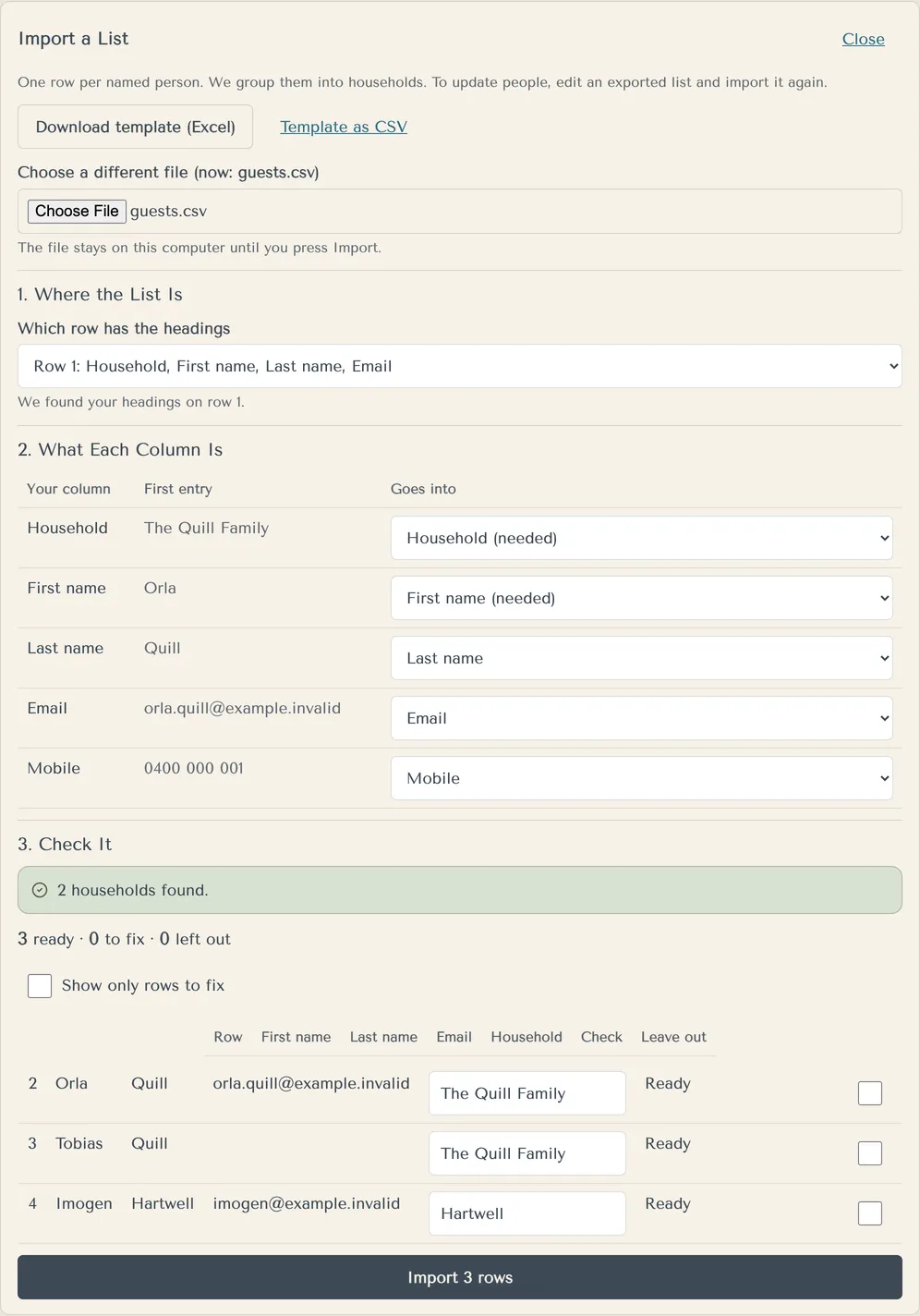
Each guest then has their own link, and one person can reply for their whole household. Importing your own sheet with no Household column? We suggest each person's surname, and you confirm it.
Trying it is free with up to 5 guests. Importing more than 5 guests needs a paid plan: Wedding at A$229 or Pro at A$299, paid once. Both hold your whole list, and sending invitation emails to guests comes with them too.
To change the list later, export it from the studio, edit it and import it again (How do I get our list into Excel?).
Questions
Is there a Google Docs version of this guest list template?
No. A guest list needs a spreadsheet, so it can sort, filter and count. Use Google Sheets instead: open a new sheet, choose File, then Import, and upload the Excel file. It keeps all three tabs.
Source: Google
Can I print the wedding guest list template?
Yes. Print the Guest list tab in landscape and fit all columns to one page wide. Hide the grey planning columns you are not using first, or the text gets very small. Print the Summary tab on its own for your venue meeting.
Is the guest list template really free?
Yes. There is no email, sign-up or payment, and you can use it in Excel or Google Sheets for as long as you like. Importing it into yourwedding.app is free for up to 5 guests. A bigger list needs the Wedding or Pro plan, paid once.
Does the template work in Apple Numbers?
Numbers opens Excel files, so you can fill it in there. To import it into yourwedding.app, export it back to Excel first, because the import takes .xlsx or .csv files. On a Mac, choose File, then Export To, then Excel.
Source: Apple
Can we share the guest list with our parents or planner?
Yes. In Google Sheets, share the file and choose who can edit. Agree on one master copy, so two lists never drift apart. It holds names and contact details, so share it only with people who need it. On yourwedding.app you can add a partner and a planner, and each signs in as themselves.
Can we track RSVPs in the spreadsheet?
Yes. Use the RSVP column, and the Summary tab counts your yeses and nos. You type every reply in by hand, though. If guests reply online, their answers arrive by themselves, and the RSVP column does not import.
How do we cut down our wedding guest list?
Agree on rules before you discuss names, then apply them to both sides. Common ones: you have both met them, you have seen them in the last year, and no plus-ones for single guests. Move anyone you are unsure about to the B list rather than deleting them.
Does the wedding party go on the guest list?
Yes. Add your bridal party, their partners and anyone else eating at the reception, so your catering count is right. Add the two of you too, if your venue counts you in the numbers. Suppliers like the photographer may need meals but not invitations, so check your contract.