Link an RSVP button on your Canva site to an outside form. Canva says its own forms are always anonymous on Canva Websites, so use Google Forms, Tally or Jotform instead. Out of the box, none of them checks replies against your guest list. For that, give each guest their own RSVP link from an RSVP site.
At a glance5 points · 7 sections
At a glance
- Canva has forms, but on Canva Websites "responses are always anonymous". You can't tell who replied.
- Link a button to a Google Form, Tally or Jotform. A link opens the form full screen on a phone.
- In Google Forms, leave Limit to 1 response off. It makes every guest sign in to a Google Account.
- Ask for every name on the invitation, a yes or no for each person, and dietary needs.
- A plain form can't check replies against your guest list. A personal link for each guest can.
Canva makes a lovely wedding website. The hard part is the RSVP, because a head count only helps if you know whose heads they are. Below is what Canva's own forms do, how to hook up an outside form, and where forms fall short.
Does Canva have an RSVP form?
Yes, Canva has forms, but on a Canva website they can't collect names.
Canva's help says: "On Canva Websites, responses are always anonymous. Names can't be collected." A form can have "up to 10 questions" and "up to 10 options per question". You see answers in a Responses panel and can download them as a CSV file (Add forms and quizzes).
Canva's wedding website page still mentions "RSVP invitations", and says you can "manage RSVPs and guest lists" (Free wedding website builder). Take the help page at its word. A reply you can't put a name to is no use for a seat count. Keep Canva's own forms for something anonymous, like song requests.
What are the ways to add an RSVP to a Canva site?
Link a button to an outside form, or send each guest their own link from an RSVP site. Here's how they compare.
| Takes names | One reply for a household | Checks your guest list | Where replies go | |
|---|---|---|---|---|
| Canva's own form, on a Canva website | No. "Responses are always anonymous" | No | No | Canva's Responses panel, or a CSV |
| Google Forms | Yes, typed by the guest | If you ask for each name | No | The form's responses, or a Google Sheet |
| Tally | Yes, typed by the guest | If you ask for each name | No | Tally, with an email to you |
| Jotform | Yes, typed by the guest | If you ask for each name | No | Jotform |
| An RSVP site with personal links | Yes, from your list | Yes | Yes. Each link belongs to one invitation | Your guest list |
Tally and Jotform both have free plans. Tally gives "unlimited forms and submissions, completely free", within its fair usage guidelines (Tally pricing). Jotform's free Starter plan allows 5 active forms and 100 submissions a month (Jotform pricing).
An RSVP site works the other way round. You start from your guest list, and each invitation carries its own link. On an online wedding RSVP like ours, one person can reply for everyone in their household, and you can see who hasn't.
How do we add a Google Form RSVP to Canva?
Build the form, publish it, copy the responder link, and link a button on your Canva site to it.
- Create a form in Google Forms and add the questions below.
- Open Settings. Leave Limit to 1 response off. Google's help says that with it on, "users must sign in to their Google Account" to fill out the form. Many guests won't have one, or won't want to.
- Turn on Allow response editing if guests may change their reply.
- Leave View results summary off. Google says response summaries "are visible to anyone who can respond to the form", so guests would see each other's answers, dietary needs included.
- Press Publish. "If the form is unpublished, responders with the link can't access it." Under General access, choose anyone with the link.
- Copy the responder link, not the address of the page you're editing (Publish & share your form with responders).
- In Canva, add a button that says "RSVP by Friday 19 February". Select it, click the link icon and paste the link (Designing websites). Then publish your site again.
- Test it on your phone, signed out of Google.
Google Forms can limit a form to one response per person, but that setting makes every guest sign in to Google. Leave it off and remove duplicates by hand.
Google Forms can also pre-fill answers in a link. You could make one link per household with their names filled in. It's slow for 60 households, and a guest can still change the name.
Should we embed the form or link to it?
Link to it. Canva lets you add embeds to a website, and Google gives you the code to embed a form. But a form squeezed into a page section can be cramped on a phone. A link opens it full screen and works the same everywhere.
What should our RSVP form ask?
Each guest's name, a yes or no for each person, and dietary needs. Keep it to five questions or so.
Please reply by Friday 19 February 2027. One reply for everyone on your invitation is perfect.
We'll use your answers to plan seats and food with our venue and caterer. Only Ada and Ben will see them.
1. Your names (everyone on your invitation)
2. Who's coming? Write each name with yes or no
3. Any allergies or dietary needs? Be specific, like coeliac or severe peanut allergy
4. A mobile or email, in case we need to reach you
5. Anything else we should know?
Say who will see the answers. Dietary needs can be health information, and guests should know where it goes. For more lines, see RSVP wording examples.
What goes wrong with form RSVPs?
Mostly, you can't be sure who a reply is from, or who hasn't replied.
- Anyone with the link can reply. A forwarded link means people you didn't invite can fill it in, under any name.
- Names don't match your list. "Kate H", "Katie and Tom" and "the Hargreaves" are one household. You match them by hand.
- Doubles. A guest replies twice, or sends a change as a new reply.
- No list of who's missing. You compare the responses with your spreadsheet to see who hasn't replied.
- Sign-in walls. A form that asks guests to sign in, or says they need permission, loses replies. Check it's published and open to anyone with the link.
- A shared sheet. If the responses go to a Google Sheet, keep it private. It holds guests' dietary needs.
When is an RSVP site a better fit?
When you want to know exactly who has replied and who hasn't, without matching names by hand.
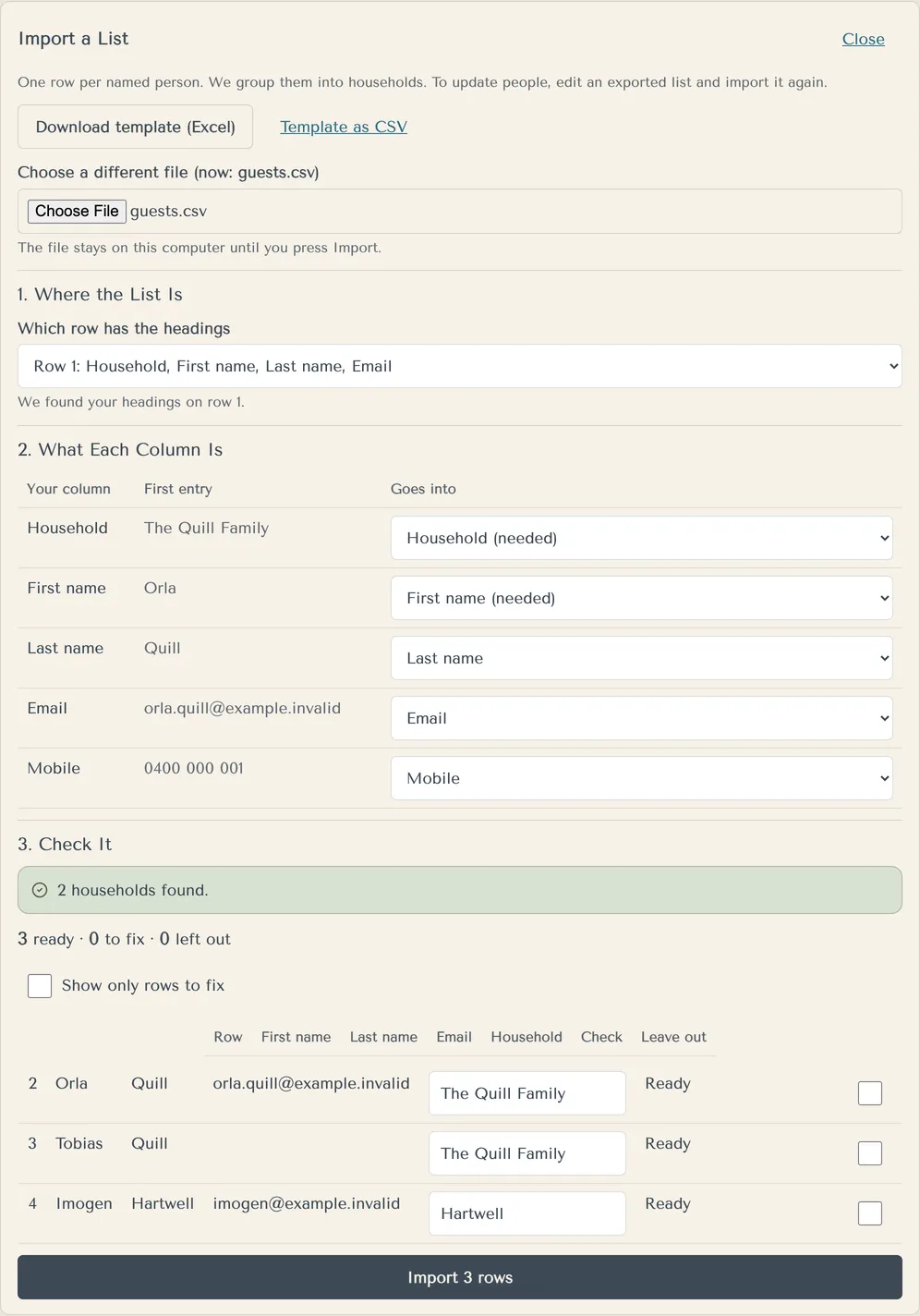
On yourwedding.app, you import your guest list from an Excel or CSV file, so a Google Sheet works once you download it (Can I import our guest list from a spreadsheet?). Each guest gets their own link with their invitation, with no account, app or password. One person can reply for everyone in their household. You can add your own questions, like a meal choice, and guests are asked to agree before they share dietary needs (Can I ask guests our own questions?).
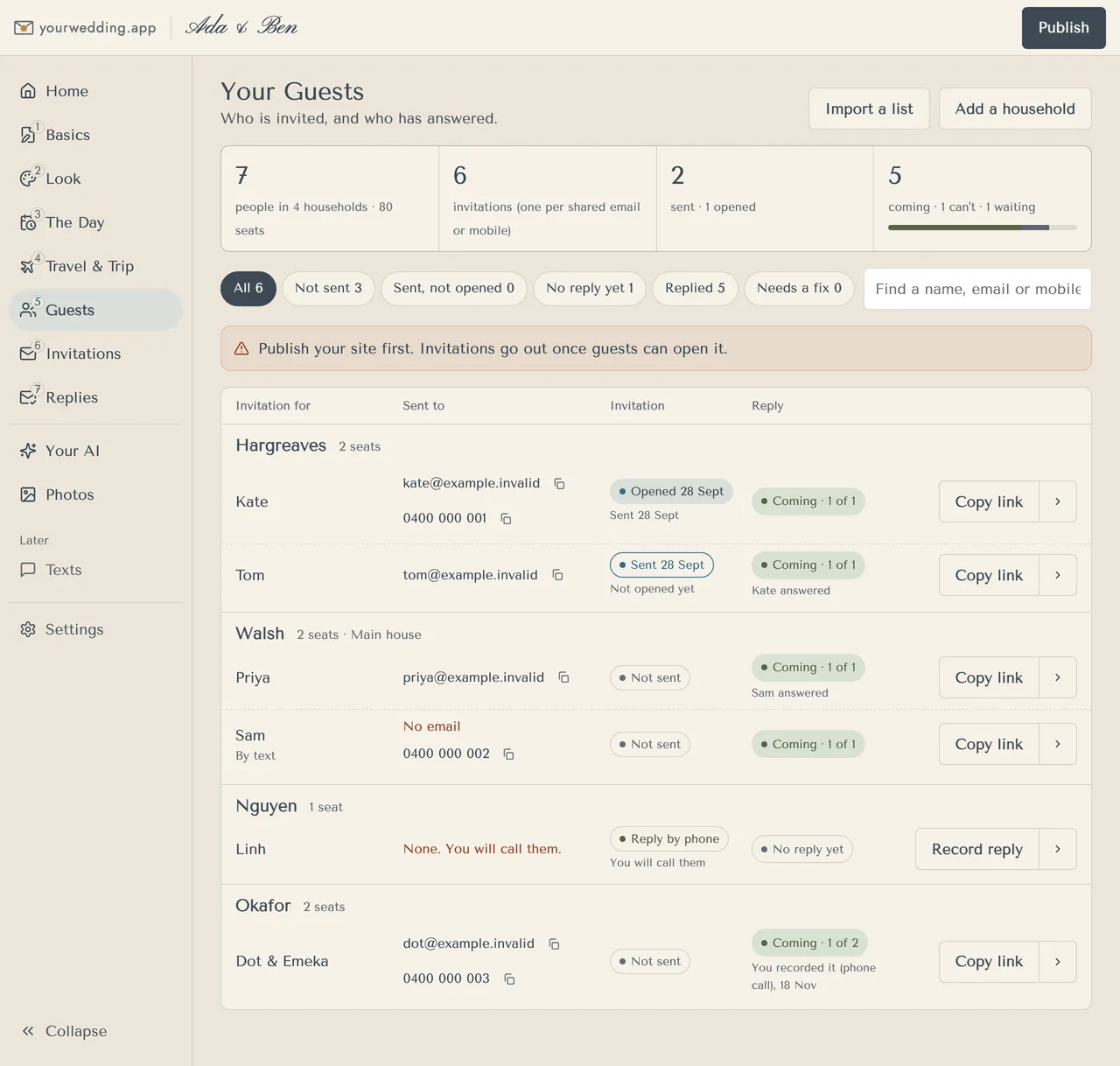
The Guests screen then shows who hasn't opened their invitation and who hasn't replied. When you're done, export the replies and a dietary list for the caterer to Excel.
You can keep your Canva site for the story and photos. Just don't put a shared RSVP form on it. Send each guest their invitation by email, or copy each guest's link into your own texts. Export Invitations for Manual Texting gives you every link in one list (Can we send the texts ourselves?). Then add a line like this to your Canva site:
To RSVP, use the link in your invitation email or text. It's just for your household. Can't find it? Message Ada on [mobile].
yourwedding.app is free for 5 guests, then A$229 once for your whole list. Other RSVP sites give each guest a link too. WedBuild, for one, lists "A personal link for every guest" and "Import a design from Canva or PowerPoint" on every plan, including its free one (WedBuild pricing). See how Australian wedding websites compare.
Questions
Is there a free way to add an RSVP to a Canva website?
Yes. Link a button to a free form. Tally says its free plan has unlimited forms and submissions, within its fair usage guidelines. Jotform's free Starter plan allows 5 active forms and 100 submissions a month. Canva Free publishes websites with up to 10 sections per page.
Can we see who RSVP'd on a Canva form?
Not on a Canva website. Canva's help says responses there are always anonymous and names can't be collected. With Google Forms, Tally or Jotform you see the names guests type, but you still match them to your list yourself.
Source: Canva
Why is our Canva RSVP form not working?
Check three things. The form is published and open to anyone with the link. You pasted the responder link, not the editing link. And Limit to 1 response is off, because it makes guests sign in to Google. Then republish your Canva site and test it on a phone.
Source: Google Docs Editors Help
Can guests change a Google Form RSVP?
Only if you turn on Allow response editing in the form's settings. Google's help says you choose whether someone can edit a response they've already submitted. Otherwise a change of plan arrives as a second reply, and you work out which one is right.
Source: Google Docs Editors Help
Does Tally email us when a guest replies?
Its pricing page lists self email notifications on the free plan, so you can get an email when a form is submitted. Tally also lists Google Sheets integration and a way to prevent duplicate submissions.
Source: Tally
Is Typeform's free plan enough for a wedding RSVP?
Check before you send. Typeform's pricing page says its free plan has a limited number of responses per month, but doesn't give the number there. Count your households first.
Source: Typeform
Can we move our guest list from a Google Sheet?
Yes. Download the sheet as an Excel or CSV file and import it on yourwedding.app. You match each column to names, emails and mobiles, and the file stays on your computer until you press Import.