How do I share our photographer's photos?
Last updated 17 October 2026
Add them under Your wedding photos. They sit at the top of the guests' Photos page.
- Open Photos. Under Your wedding photos, press Add photos.
- Add A note to your guests and Photographs by if you like.
- Tick Guests can save these photos to let guests save copies.
- Tick Email guests when we share them to tell them.
- Press Share with guests.
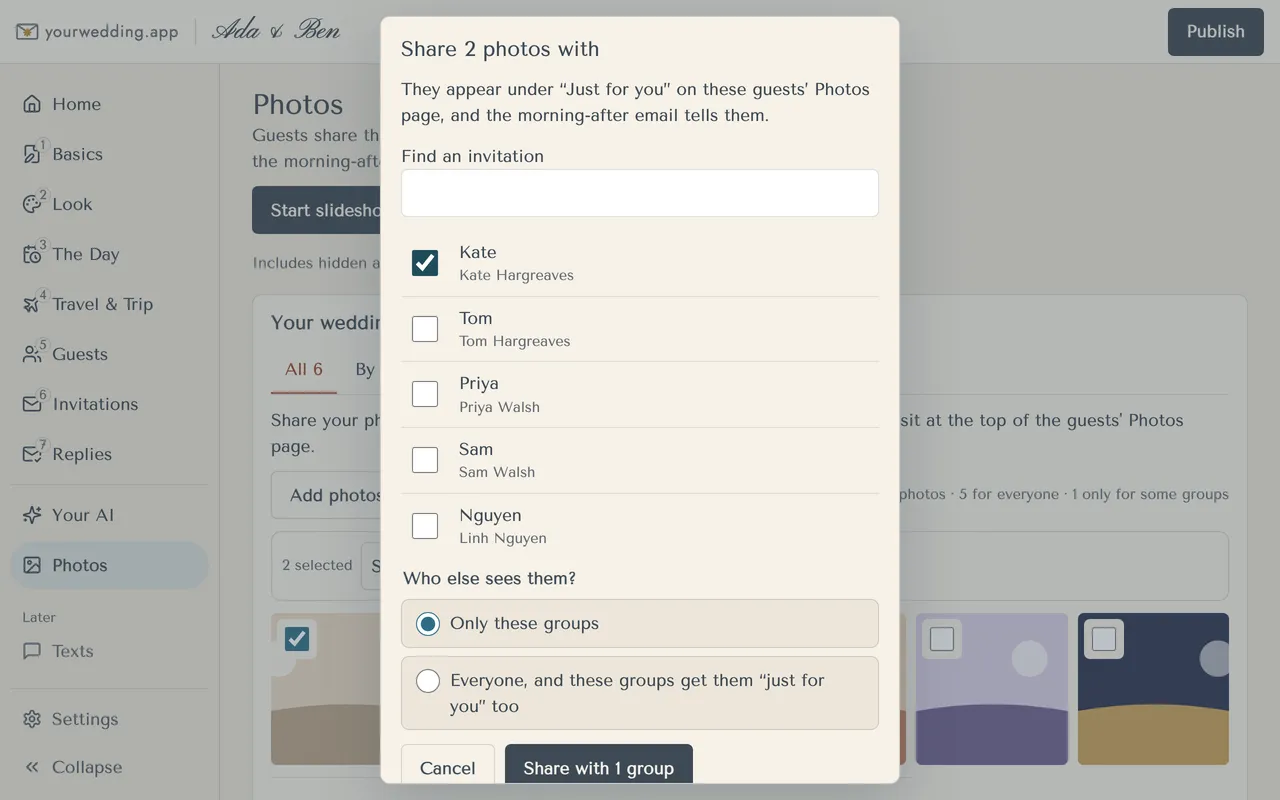
To share some photos with only some guests, press Select, pick the photos and press Share with groups…. Pick the invitations, then choose Only these groups or Everyone, and these groups get them "just for you" too.
Check your photographer is happy for you to share them. You can add up to 500 photos, each up to 50 MB.
More in Photos
- How do guest photos work?
From your wedding day, guests add photos and videos from their phones to your Photos page. You can share your own photos with them too. Photos come with a paid package.
- When can guests add photos?
From midnight at the start of your wedding day, until we delete guest details. Times follow your wedding's time zone.
- How do guests find the photos page on the day?
Print the table card. It has a QR code to your Photos page.
- Where do I see what guests shared?
Under Guests' photos on the Photos page.
- How do I hide a photo?
Open the photo and press Hide from guests. You can restore it any time.
- How do I tag guests in photos?
Press Tag your photos and add guests to each photo. Tagged guests find them under "Just for you".
- Can we show photos on a screen at the reception?
Yes. The slideshow shows guests' photos and your own, live, eight seconds each. New photos show next.
- How do I download everything?
Press Download everything on Photos. We make a zip and email you when it's ready, usually within an hour.
Still stuck?
Open Help in the studio and choose Contact us. We email you a reference. Can’t sign in? Email us instead.
Contact us in the studioEmail hello@yourwedding.app
Guests: please ask the couple first.