A guest's link was shared by mistake. What do I do?
Last updated 17 October 2026
Give them a new link. The old one stops working straight away.
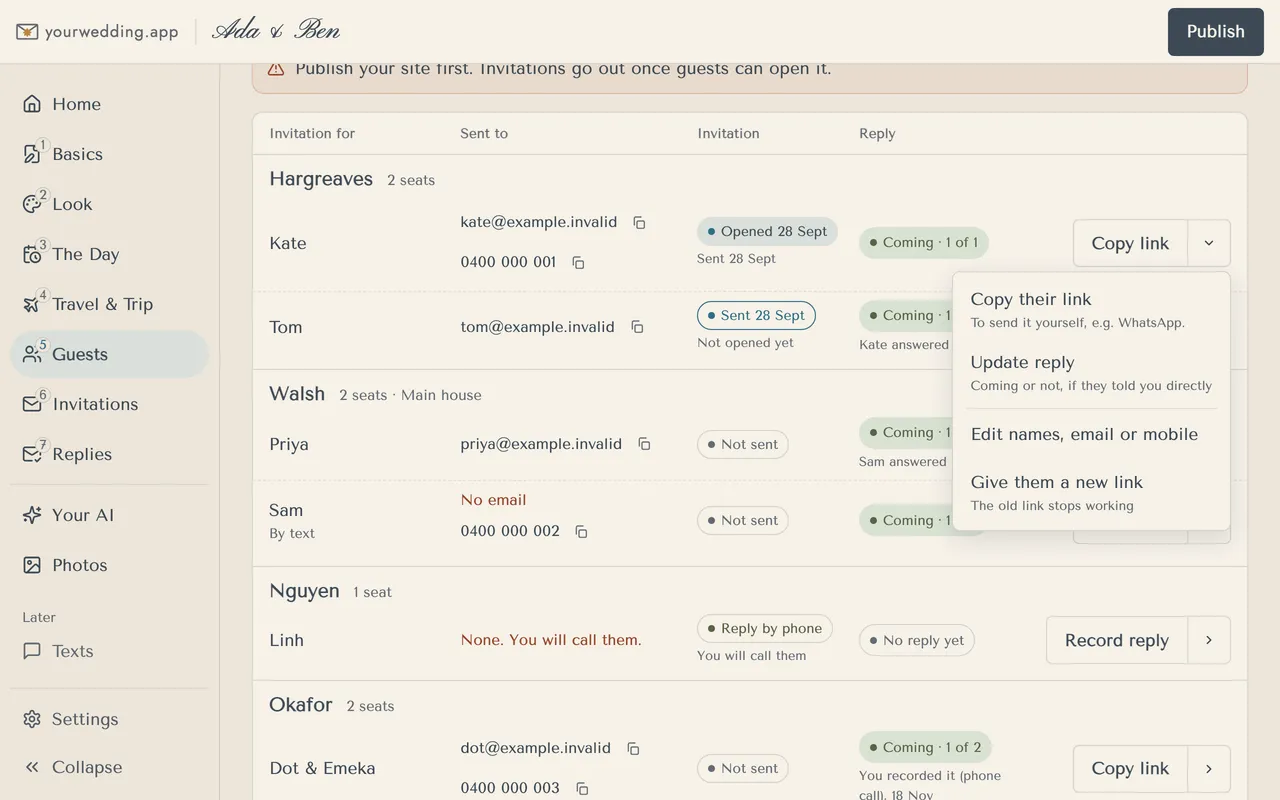
- Open Guests and find the person.
- Open the menu beside their button (the arrow).
- Choose Give them a new link, then Make a new link.
- Copy the new link and send it to them.
The same menu lets you Copy their link, Update reply, Mark as sent or Edit names, email or mobile.
More in Guests and households
- How do I add guests?
Add one household at a time, with everyone in it named. A household is the people who share an invitation, like a couple or a family.
- Can I import our guest list from a spreadsheet?
Yes. Import a CSV or Excel file with one row per person. We group people into households for you.
- How do I find a guest or see who's waiting?
Use the filters and the search box on Guests.
- How do I add children or plus-ones?
Add children to their family's household and tick Child (under 16). There are no unnamed plus-ones: add every guest by name.
- How do I get our list into Excel?
Open Replies and use Export to Excel. Every list comes as Excel or CSV.
Still stuck?
Open Help in the studio and choose Contact us. We email you a reference. Can’t sign in? Email us instead.
Contact us in the studioEmail hello@yourwedding.app
Guests: please ask the couple first.