How do I reply?
Last updated 17 October 2026
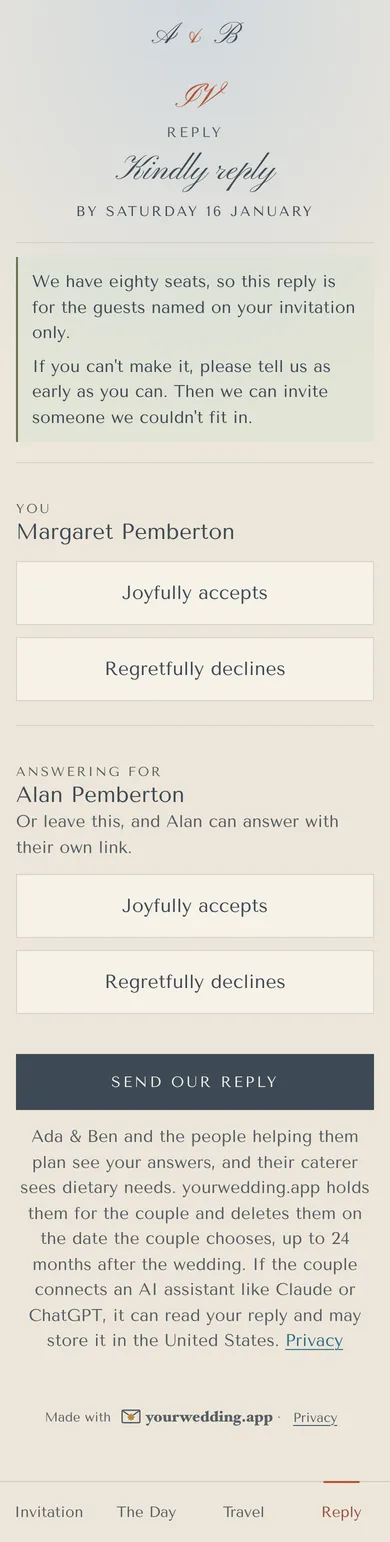
Open your invitation, tap Reply, and answer for everyone on your invitation.
- For each person, choose Joyfully accepts or Regretfully declines.
- Add any dietary needs or allergies. Tick to share them with the couple, their helpers, their caterer and any AI assistant they connect, which may store them in the United States.
- Answer any travel or bed questions, and the couple's own questions.
- Tap Send my reply or Send our reply.
You'll get a copy by email if your invitation was emailed to you.
You can answer for others on your invitation, or leave them to answer with their own link.
More in For guests
- How do I open my invitation?
Tap the link in the email or text the couple sent you. It opens your own invitation.
- I can't find my invitation link.
Type the code from your message, or ask the couple for a new link. We can't look up invitations by name or email.
- How do I change my reply?
Open your link again and tap Change our reply, until the reply-by date.
- How do I share my photos?
From the wedding day, open the Photos page and tap Add your photos.
- How do I stop emails or texts?
Use the unsubscribe link in any email, or reply STOP to any text.
- Who do I contact with a question?
Ask the couple. Reply to their email, or reply to their text as it explains.
Still stuck?
Open Help in the studio and choose Contact us. We email you a reference. Can’t sign in? Email us instead.
Contact us in the studioEmail hello@yourwedding.app
Guests: please ask the couple first.