A guest told us by phone. How do I record it?
Last updated 17 October 2026
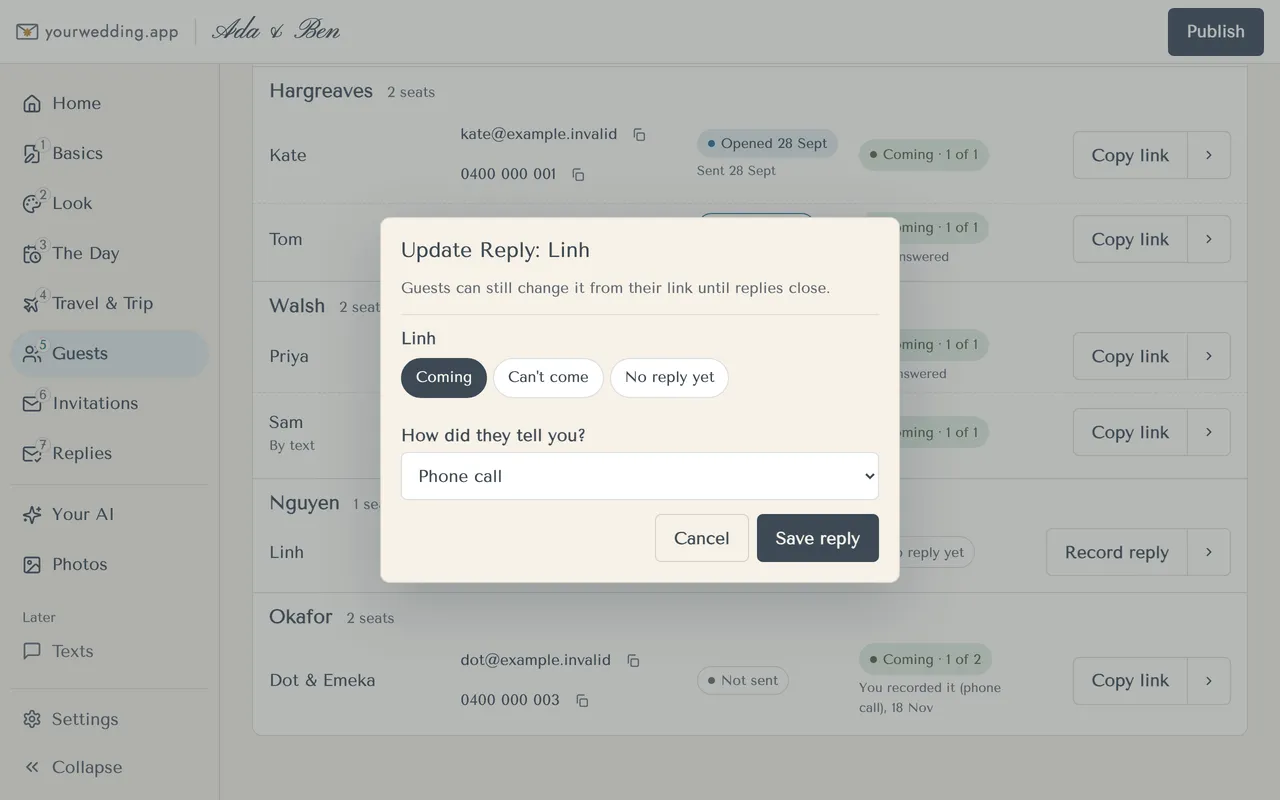
Use Update reply on their row. Guests can still change it from their link until replies close.
- Open Guests and find the household.
- Press Record reply, or choose Update reply from the row's menu.
- For each person, choose Coming, Can't come or No reply yet.
- Under How did they tell you?, choose Phone call, In person or Text or message.
- Press Save reply.
This records who's coming. It doesn't record dietary needs or answers to your questions.
More in Replies
- How do I see who's coming?
Open Replies. It shows live counts and lists for the caterer, the coach and the houses.
- Can I ask guests our own questions?
Yes, up to 10. Guests see them after they accept.
- Where do I find dietary needs for the caterer?
In the Dietary card on Replies, and in the Dietary export.
- What happens when replies close?
Guests can't reply or change their reply after the end of your Replies close day, at the venue.
- Will we get an email when someone replies?
Yes. Each of you gets an email about 2 minutes after a guest replies. You can switch to a daily digest, or turn them off.
Still stuck?
Open Help in the studio and choose Contact us. We email you a reference. Can’t sign in? Email us instead.
Contact us in the studioEmail hello@yourwedding.app
Guests: please ask the couple first.