How long do you keep guest details?
Last updated 17 October 2026
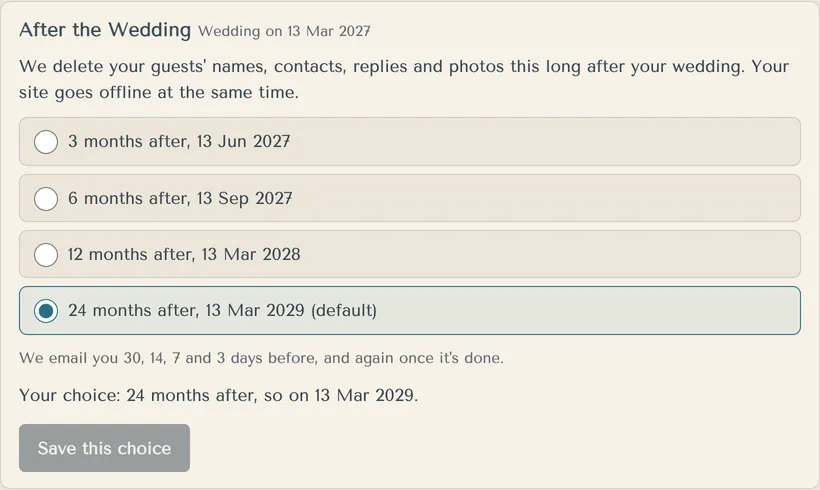
24 months after your wedding, unless you choose a shorter time. Then we delete guests' names, contacts, replies and photos, and your site goes offline.
- Open Settings and find After the Wedding.
- Choose 3, 6, 12 or 24 months after your wedding.
- Press Save this choice.
We email you 30, 14, 7 and 3 days before, and again once it's done. Download anything you want to keep first.
When the day comes, your site is hidden first. You can press Undo for 7 days before it's deleted for good. If a reminder email didn't reach you, we move the day back so it does.
Any text credits left end when the wedding is deleted.
We keep payment records for at least 7 years, as company and tax law require. Deleting a wedding doesn't delete them.
More in Privacy and your data
- Who can see our guests' details?
Only you, anyone you add to your studio, and the people you share exports with. Guest details are stored in Sydney.
- How do I delete our wedding?
The person who created the wedding can delete it in Settings. It can't be undone.
- Where are your terms and privacy policy?
On our website, and linked at the bottom of every guest page.
Still stuck?
Open Help in the studio and choose Contact us. We email you a reference. Can’t sign in? Email us instead.
Contact us in the studioEmail hello@yourwedding.app
Guests: please ask the couple first.