Can we text our guests?
Last updated 17 October 2026
Yes, on Wedding or Pro, using text credits. Texts go to Australian mobiles only, from one yourwedding.app number shared by many weddings.
- Publish your site and make sure you have credits.
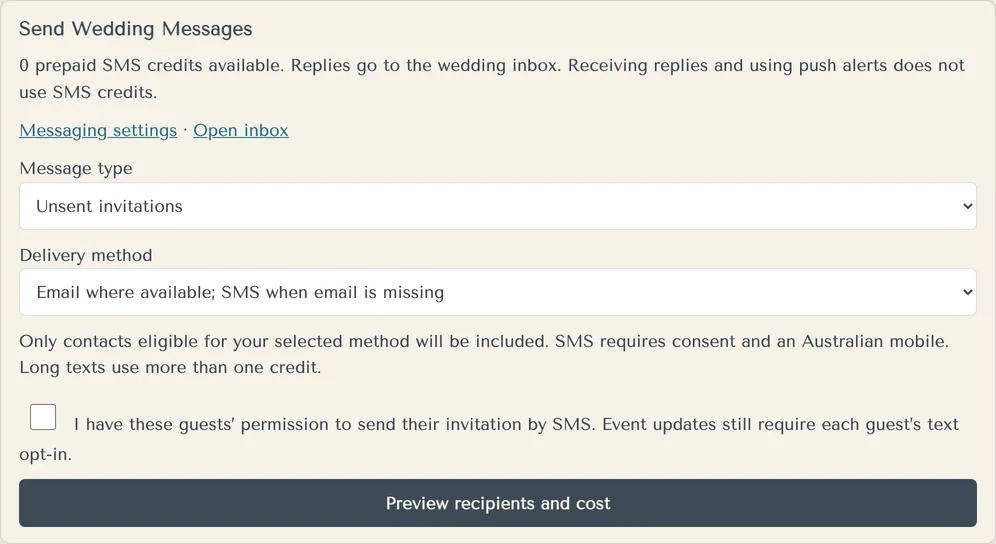
- Open Invitations and find Send Wedding Messages.
- Pick a Message type: Unsent invitations or Wedding update.
- Pick a Delivery method, such as Email where available; SMS when email is missing.
- For invitations by text, tick that you have these guests' permission.
- Press Preview recipients and cost. Check who's included, who's left out and why, and how many credits it uses.
- Press Confirm and send. The preview expires after 15 minutes.
Wedding updates only go to guests who are coming and who ticked to get texts on their reply.
A text up to 160 characters uses one credit. Longer texts use more. A text can be at most ten parts.
Every text ends with how to reply and "STOP ends texts."
More in Invitations and texts
- How do I send our invitations?
Publish your site, then send from Invitations. Each invitation has its own private link.
- Why can't I send invitations?
The studio tells you why in a note under the button. There are three reasons.
- Can we send the texts ourselves?
Yes. Download the SMS send list and upload it to your own SMS provider, such as ClickSend.
- Do guests under 16 get texts?
No. We never text a guest under 16, for any reason.
- A guest asked to stop emails or texts. What happens?
We stop straight away, and the studio shows it.
- Can I send reminders?
There's no separate reminder email. You can resend a guest's invitation, or copy their link and send it yourself.
- Where do guests' text replies go?
To your wedding inbox. Guests reply to a text, and you read and answer them in the studio.
Still stuck?
Open Help in the studio and choose Contact us. We email you a reference. Can’t sign in? Email us instead.
Contact us in the studioEmail hello@yourwedding.app
Guests: please ask the couple first.