How do I send our invitations?
Last updated 17 October 2026
Publish your site, then send from Invitations. Each invitation has its own private link.
- Press Publish first.
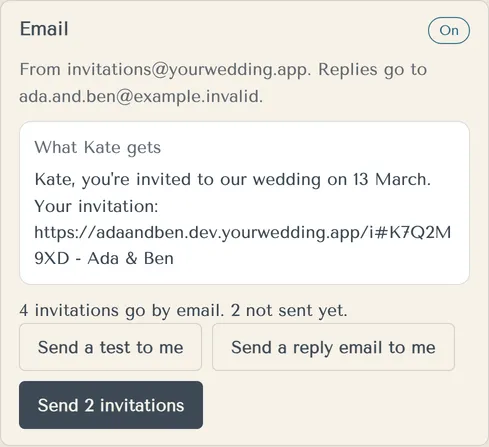
- Open Invitations and find the Email card.
- Press Send a test to me to see what guests get.
- Press Send … invitations.
- Confirm with Yes, send them. You can't unsend.
Guests get an email from invitations@yourwedding.app with an Open invitation & reply button. When they reply to the email, it goes to your address from Basics.
You can also send from Guests. Filter by Not sent and press Send … invitations, or Resend to these under Sent, not opened.
We skip anyone we shouldn't email and tell you why. For example, an address we emailed less than an hour ago, or a guest who asked for no more emails.
More in Invitations and texts
- Why can't I send invitations?
The studio tells you why in a note under the button. There are three reasons.
- Can we text our guests?
Yes, on Wedding or Pro, using text credits. Texts go to Australian mobiles only, from one yourwedding.app number shared by many weddings.
- Can we send the texts ourselves?
Yes. Download the SMS send list and upload it to your own SMS provider, such as ClickSend.
- Do guests under 16 get texts?
No. We never text a guest under 16, for any reason.
- A guest asked to stop emails or texts. What happens?
We stop straight away, and the studio shows it.
- Can I send reminders?
There's no separate reminder email. You can resend a guest's invitation, or copy their link and send it yourself.
- Where do guests' text replies go?
To your wedding inbox. Guests reply to a text, and you read and answer them in the studio.
Still stuck?
Open Help in the studio and choose Contact us. We email you a reference. Can’t sign in? Email us instead.
Contact us in the studioEmail hello@yourwedding.app
Guests: please ask the couple first.